Before you rely, check the evidence.
FREE IPHONE APP · PREPARING FOR RELEASE
An invoice. An agreement. An AI-generated recommendation. The Truth Calculator helps you organize the records behind a claim, see what is missing, and identify what to check next.
Explore an example below. The free iPhone app is preparing for release and is not yet available on the App Store.
The Truth Calculator™ · Free for iPhone
Before you rely,
check the receipts.
Check an AI answer, an invoice, or a claim you might share. Keep its records together, review what needs attention, and save a PDF.
Your evidence. Your device. Your decision.

Available on the App Store · iPhone · iOS 17.0 or later · English

On a computer?
Scan with your iPhone camera to open the App Store.

One question. A closer look.
See what a receipt
can—and cannot—tell you.
Watch the full film, including a real iPhone walkthrough: photograph a handwritten sample receipt, review the actual readiness result, and open its PDF preview.
The receipt is fictional. The demonstration uses the released app; footage is edited and reading holds are added. Illustrative human scenes and narration use AI. Evidence readiness is not a truth verdict.
Read the film transcript
Have you ever looked at a bill and thought, hang on, what am I actually paying for? Or read an answer from AI that sounded convincing, but left you wondering what backed it up? The Truth Calculator gives you a place to work through that question. Bring the claim and its supporting records together, see what's missing, and decide what to check next. That might start at the kitchen table, with a bill you don't understand. It might be an investigation, or a team getting ready to hand over its work. In each case, the records matter.
Let's try a simple example on the iPhone. We'll use this handwritten receipt for twenty dollars. First, enter the question: Is this a good receipt?
Then open Camera, take a photograph, and add it to the check.
We've added the picture. Now we need to look at what it actually supports. A photograph alone doesn't tell us whether the receipt is enough for the decision we're making.
Review the inputs, then run the check.
Here's the result: ten out of one hundred. Foundation incomplete. The next action is Verify First. That doesn't mean the receipt is false. We've added one evidence item, but we haven't linked a reviewed supporting receipt. And our question, "Is this a good receipt?", needs more detail.
Good enough for what? Which payment, which date, and which decision? The app points us toward a clearer question before we rely on the answer.
From here, create a PDF preview. Check the selected contents and the privacy notice before you share it.
The free core works locally on your iPhone. You don't need an account or a cloud evidence-processing service. Keep an eye on who can access your device, your backups, and any copies you share.
The Truth Calculator doesn't detect lies or authenticate documents. Your judgment still matters. It helps you keep the evidence and the unanswered questions in view.
As your questions grow, visit the xOSYSTEM™ page for the latest release status.
For now, start with one question of your own. Try the free iPhone app, add a record, and see what needs a closer look. Your evidence. Your device. Your decision. The Truth Calculator. Visit the truth calculator dot com, slash free dash app.
Music: “Horizons” by Scott Buckley, CC BY 4.0. Original track. Edited and mixed under narration.
Try the free iPhone appIncluded in the free release
Keep the basis for your decision.
Start with a specific claim.
Add supporting or contradictory receipts from text, Files, Photos, Camera, or Document Scan.
See what needs attention.
Review the evidence-readiness summary. Consider the records you supplied and the questions still open.
Return to the record.
Revisit saved checks in History. Create a PDF to keep or deliberately share through the supported export options.
Evidence readiness concerns the records you supplied. It does not establish that a claim is true or false, authenticate documents, or replace professional judgment.
Get the free iPhone appYour first check
Begin with a small,
specific question.
- Install The Truth Calculator from BEYONDx Advisors, LLC. on a compatible iPhone.
- Choose Start a New Truth Check. Enter one clear claim.
- Add the supporting or contradictory records you are permitted to use.
- Continue to review and run the readiness check. Read the gaps and limits alongside the summary.
- Return through History, or create a PDF record to keep or share. Preview what it contains before exporting.
For a first try, use a fictional example rather than personal or confidential records.
Open the App Store →
A few clear answers.
Which devices can use it?
The current release is an English-language iPhone app requiring iOS 17.0 or later. Check the App Store on your device for local availability and compatibility. An Android, iPad, or web edition is not being announced.
What is free?
The released core includes claims, selected evidence, readiness review, saved checks in History, and PDF records. No account is required for the core review. Planned specialist products are separate future offerings; no upgrade is required to begin.
Where does my evidence go?
The core review works locally on your iPhone without requiring a cloud evidence-processing service. You choose when to export. Device access, backups, and exported copies still matter. Read the app privacy explanation.
The website and email service are separate from the app’s evidence handling. Their existing privacy information applies when you visit the site or subscribe.
Does the result tell me whether a claim is true?
No. It helps you review the evidence you supplied. A missing record does not prove a claim false, and a complete-looking package does not prove it true. The app cannot supply missing evidence or replace appropriate human review.
Where can I get help?
Use the BEYONDx support contact. Describe the screen, app version, and problem without sending personal evidence. For learning examples, use the Decision Receipt Lab below and the FAQ & Resources.
What about Founding Access?
You can follow future product updates through Founding Access. The existing offer terms govern any earlier subscriber benefit; downloading the app or subscribing now does not establish eligibility for a complimentary future upgrade.
Decision Receipt Lab
What are you about to do?
Choose a situation. Follow a fictional example from a claim to the records behind it, the missing information, and a useful next question.
Pay · Fictional example
Does this invoice match the estimate?
- The claim
- “The $1,250 invoice covers the work we agreed.”
- The supporting record
- The estimate lists $1,000. The invoice includes an additional $250 fee.
- What is missing
- The supplied records contain no explanation of the fee or approval for the change.
- A useful next question or action
- Ask for the itemized change and the record showing it was agreed.
Sign · Fictional example
Is the promised support in the agreement?
- The claim
- “Twelve months of support are included.”
- The supporting record
- The proposal mentions support. The agreement refers to a separate service schedule.
- What is missing
- The service schedule is missing, so the scope and duration of support cannot be compared.
- A useful next question or action
- Request the referenced schedule and compare its terms with the proposal before deciding.
Dispute · Fictional example
What record explains the decision?
- The claim
- “Your request did not meet the stated requirements.”
- The supporting record
- A decision notice cites a policy and gives a response deadline.
- What is missing
- The policy version and the records used to reach the decision are not included.
- A useful next question or action
- Note the stated deadline and request the policy and records behind the explanation.
Decide · Fictional example
Does the AI recommendation fit your project?
- The claim
- “Option A is the best fit for this project.”
- The supporting record
- A saved AI response cites two sources comparing price and speed.
- What is missing
- The response does not show your project requirements, the source dates, or a review of alternatives.
- A useful next question or action
- Define the requirements and compare the original sources before choosing a direction.
A receipt keeps the selected support and the unanswered questions together. It does not certify the claim or authorize an action.
These examples are learning exercises, not app results or professional advice. Your selections stay on this page; this interaction does not store or send them.
From the example to your own question
Start with one claim. Build a clearer record.
The free iPhone app is designed to help you organize a question that matters and the evidence you choose to bring to it.
- Make the claim specific.Write down the statement you may rely on and the decision it could affect.
- Connect the supporting records.Keep the source, date, version, and relevant passage together. Preserve conflicts and missing information.
- Read the result with judgment.Review evidence readiness and consider a cautious next action, such as Verify First.

Intelligent edge, in plain English
Keep the review close.
Choose what you share.
“Edge” means the review happens on your device, close to the work. The core review works locally on your iPhone with the records you select, without requiring an account or cloud evidence-processing service.
Choose your records.
Bring a specific claim and permitted material into scope. What you leave out is still outside this review.
Keep the basis visible.
Examine support, conflicts and missing information. Working offline does not supply a record you have not brought with you.
Decide what leaves.
Keep the review or deliberately use a supported output route. Preview the record and consider the destination before sharing.
Device access, backups and exported copies still matter. Local processing supports careful handling; it is not a guarantee of confidentiality. Read the app privacy explanation →
What a receipt can—and cannot—tell you
Understand what the result can tell you.
The Evidence Readiness Index reflects how complete, organized, traceable, and internally consistent your selected records appear. It keeps unresolved gaps visible and suggests a cautious next action, such as Verify First. It does not establish whether a claim is true.
Keep the record useful.
Keep your claim and chosen records together on your iPhone. Return to saved checks in History and create a PDF record to keep or share. Preview its contents and consider the destination before exporting.
Your judgment remains essential.
The app does not investigate for you or replace human or professional judgment. It does not provide legal conclusions, medical judgments, financial decisions, compliance determinations, certifications, or guaranteed outcomes.
The controlled free core does not require an account or use a cloud evidence-processing service. It does not include an active Forensic Investigator purchase. The free iPhone app is available on the App Store. Requires iOS 17.0 or later.
Explore the Evidence Readiness PathfinderOptional deeper learning: follow an evidence gap into a setting that matters to you.
EVIDENCE READINESS PATHFINDER
Which part of your evidence needs a closer look?
Choose a gap, a setting, and the level of detail you need. Explore what to look for, what the free app is designed to organize, and how a planned ecosystem path might relate.
Educational boundary: This is an educational guide—not a risk score, compliance determination, product recommendation, truth determination, or professional advice.
Claim-to-action evidence path
Selected evidence gap: Original source.
STEP 1 · EVIDENCE SIGNAL
Which part of the evidence chain is least clear?
STEP 2 · MARKET CONTEXT
Where could the decision land?
STEP 3 · LEVEL OF STRUCTURE
How much structure fits the situation?
YOUR EDUCATIONAL RESULT
Original source · Aerospace, Defense, Drones & Autonomy
1 · The gap to resolve
Original source
Reconnect the claim to its origin: source, exact passage or artifact, date, and context.
2 · What should add up in this context
Aerospace, Defense, Drones & Autonomy
Mission scope · authority or requirement · configuration or version · test or telemetry artifact · limitation or hazard · mitigation · human action
Receipt pattern: Mission Receipt
3 · What the free app is designed to help organize
One claim. The records you choose. The gaps still open.
The free Truth Gap Check helps organize one consequential claim and selected records, keep the chosen gap visible, and support a cautious next action. The iPhone app is available on the App Store.
4 · When an optional planned upgrade may become relevant
Start with the free app.
For one consequential claim, the free Truth Gap Check is designed to connect the claim to the records you choose, keep gaps visible, and support a cautious next action. The iPhone app is available on the App Store. You may stop with the free experience; no upgrade is required.
Selected planned path: Mission Evidence. Planned only; not currently available or purchasable.
5 · What this result does not establish
An incomplete evidence package does not prove a claim is false. A complete-looking package does not prove it is true.
This result does not determine risk, readiness, compliance, truth, or the professional action anyone should take.
COMPLETE EVIDENCE REFERENCE
Review every evidence path and boundary.
Open any section to review the complete guidance.
FEATURED PATH · AEROSPACE, DEFENSE, DRONES & AUTONOMY
Make the evidence chain reviewable before the consequence becomes operational.
Before a test result, design change, supplier assertion, AI or autonomy output, or mission claim moves forward, make its evidence chain reviewable—source, configuration, conditions, limitations, unresolved gaps, and accountable human action.
CIVIL AVIATION AND UAS
Before a claim becomes an operational action
Before a claim becomes a release, dispatch, maintenance action, operational change, waiver submission, or safety response, connect the mission scope, governing authority, aircraft or system configuration, applicable version, test or telemetry evidence, identified hazard or limitation, mitigation, and responsible human action.
DEFENSE AND AUTONOMY
Use only approved, non-sensitive material
Using only approved, non-sensitive material, connect the mission purpose, governing authority or requirement, configuration or version, test or assurance evidence, operating conditions, known limitations, unresolved gaps, human review, and resulting action.
A CAREFULLY QUALIFIED “WHY NOW”
FAA Safety Management System requirements have expanded for certain covered aviation organizations. Existing covered Part 135 operators and Part 91.147 air-tour operators generally have until May 28, 2027 to meet the updated Part 5 requirements. This is not a universal aerospace deadline, and using The Truth Calculator would not by itself satisfy Part 5.
Aerospace and Defense boundary: The Truth Calculator is an evidence-readiness aid. It does not establish airworthiness, safety, conformity, mission readiness, regulatory compliance, certification, safety-case acceptance, acquisition approval, DoD AI compliance, CMMC status, authorization, or truth. It is not an authoritative engineering repository, configuration-management system, approved test environment, government system of record, or substitute for authorized human or professional judgment.
Do not enter sensitive or controlled information.
Do not enter classified information, CUI, FCI, export-controlled or ITAR-restricted material, procurement-sensitive information, proprietary mission data, protected health information, operationally sensitive information, or anything you are not authorized to handle.
Research basis—not product endorsement
These official sources support the educational context; they do not require, approve, certify, or endorse The Truth Calculator. Each source opens in a new tab.
Review all five evidence signals
Original source
Reconnect the claim to its origin: source, exact passage or artifact, date, and context.
Evidence Path checkpoint: SOURCE
Version used
Preserve the version behind the answer: document, model, software, policy, or configuration—plus the input and output reviewed.
Evidence Path checkpoint: VERSION
Complete record
Bring the claim and supporting records into one traceable sequence without losing origin, date, or order.
Evidence Path checkpoint: OPEN GAP
Conflicts or omissions
Keep disagreement visible: which items conflict, which source is missing, and what remains unresolved.
Evidence Path checkpoint: OPEN GAP
Human review
Record who reviewed what, what judgment was applied, and what action or reconsideration path remains.
Evidence Path checkpoint: HUMAN REVIEW
Review all eight evidence chains and planned paths
These are educational evidence patterns—not universal mandates. Every specialist path below is planned and is not currently available or purchasable.
Aerospace, Defense, Drones & Autonomy
What should add up: Mission scope · authority or requirement · configuration or version · test or telemetry artifact · limitation or hazard · mitigation · human action
Receipt pattern: Mission Receipt
Planned path: Mission Evidence
Finance & Insurance
What should add up: Data · system version · policy · output · human review
Receipt pattern: Decision Receipt
Planned path: Consequential Decisions
Healthcare
What should add up: Request · records · coverage rule · status · denial reason · appeal
Receipt pattern: Prior Auth Receipt
Planned path: Prior Authorization Review
Work, Education & Public Services
What should add up: Criteria · inputs · AI role · notice · reconsideration
Receipt pattern: Decision Receipt
Planned path: Consequential Decisions
Machines & Robotics
What should add up: Software or configuration · test · safety decision · intervention log
Receipt pattern: Machine Receipt
Planned path: Machine Evidence
Software, IoT & Maritime Cyber
What should add up: Component or SBOM · version · vulnerability · patch or configuration · incident
Receipt pattern: Cyber Receipt
Planned path: Cyber Evidence
Batteries, Supply Chains & Carbon
What should add up: Origin · supplier · location · calculation · verifier
Receipt pattern: Provenance Receipt
Planned path: Product Provenance
Legal, Media & Personal Reliance
What should add up: Claim · exact source passage · provenance · conflicts · omissions
Receipt pattern: Claim Receipt
Planned path: Claim Investigation
Review all three levels of structure
One decision
Start with the free app.
For one consequential claim, the free Truth Gap Check is designed to connect the claim to the records you choose, keep gaps visible, and support a cautious next action. The iPhone app is available on the App Store. You may stop with the free experience; no upgrade is required.
Growing investigation
Free first; investigate later if complexity grows.
If one claim expands into multiple events, people, contradictions, missing sources, and actions, the planned Forensic Investigation module may eventually provide a structured investigation workspace. It is not currently available or purchasable.
Recurring workflow
Free first; follow a specialist path only if it fits.
For recurring work in the selected context, a planned market-specific module may eventually add specialized templates, schemas, controls, reports, and acceptance tests. It is not currently available or purchasable.
Review release, evidence, and use boundaries
Educational boundary
This is an educational guide—not a risk score, compliance determination, product recommendation, truth determination, or professional advice.
Release boundary
The free iPhone app is available on the App Store. Requires iOS 17.0 or later.
Every specialist path is planned and is not currently available or purchasable.
Evidence-package boundary
An incomplete evidence package does not prove a claim is false. A complete-looking package does not prove it is true.
This result does not determine risk, readiness, compliance, truth, or the professional action anyone should take.
Be here for what comes next
Make your next question a better one.
Begin with the free iPhone app. Explore the learning examples and follow future product updates as your needs develop.
The free iPhone app is available on the App Store. Explore planned xOSYSTEM™ applications and check the latest release status.
The Truth Calculator is part of the developing xOSYSTEM™ from BEYONDx Advisors. Begin with the free app; explore planned specialist tools only as your needs grow. See how the BEYONDx family fits together →
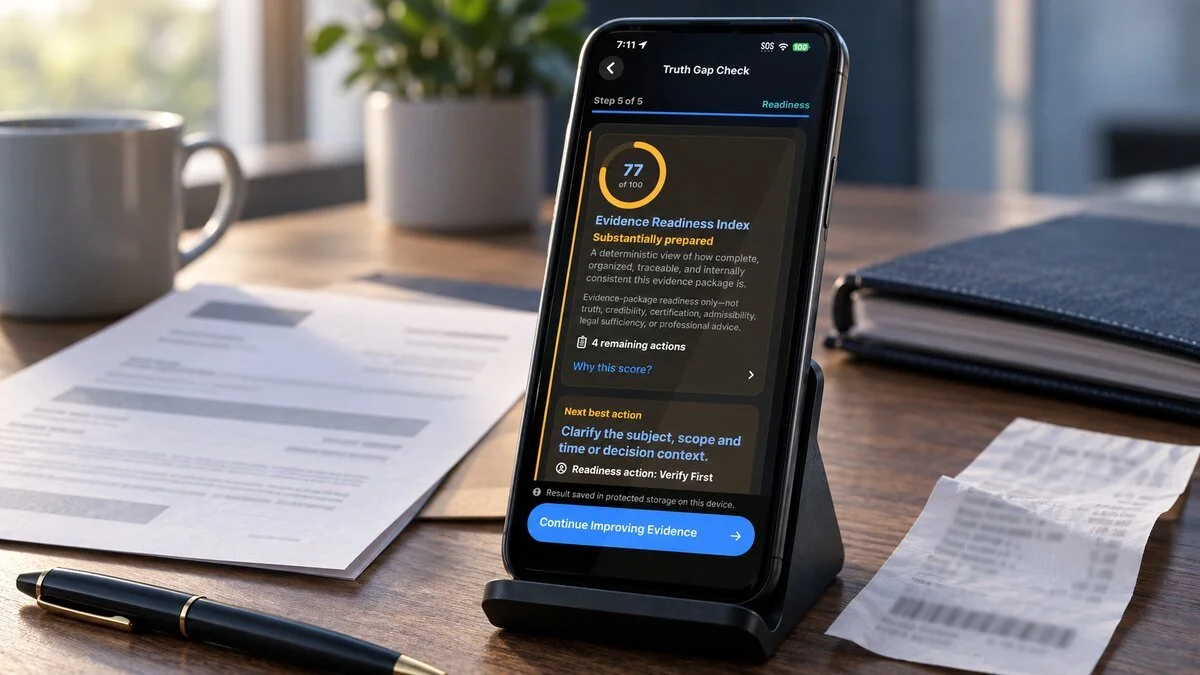
Understand what the result can tell you.
The Evidence Readiness Index reflects how complete, organized, traceable, and internally consistent your selected records appear. It keeps unresolved gaps visible and suggests a cautious next action, such as Verify First. It does not establish whether a claim is true.
Keep the record useful.
The free app is designed to keep your claim, chosen source passages, gaps, and history together on your iPhone. Prepare a receipt packet you control for Files, sharing, or printing. Privacy, clear-local-data, and accessibility controls remain subject to the verified release boundary.
Your judgment remains essential.
The app does not investigate for you or replace human or professional judgment. It does not provide legal conclusions, medical judgments, financial decisions, compliance determinations, certifications, or guaranteed outcomes.
The controlled free core does not require an account or use a cloud evidence-processing service. It does not include an active Forensic Investigator purchase. The free app is preparing for release; download availability will be stated after the official App Store listing is verified.